Google Business Profile optimization service: 15-point checklist we manage monthly
Google Business Profile optimization is setting up and maintaining your profile so it matches what nearby customers search for: the right categories, accurate hours and location, services and products, real photos, regular posts and a steady flow of genuine reviews. We work through a 15-point checklist, then manage the profile every month for $350 per location.
Most profiles I audit lose calls for simple reasons: a generic primary category, half the services missing, hours that don’t match the website. These take hours to fix, not months, and they’re the first thing we do.
I’m Đăng from SME Solution. This page explains what our Google Business Profile service covers, why each item matters, and what it costs, so you can compare it with other providers or do some of it yourself.
What Google Business Profile optimization is (and isn’t)
Google Business Profile optimization means making every part of your profile accurate, complete and relevant to the searches your customers make, then keeping it that way. It is not adding keywords to your business name, creating extra profiles, or buying reviews. Those tactics can work briefly, but they break Google’s guidelines and put the profile at risk.
The profile matters because it’s what people see first. When someone searches for a service nearby, the map results show your name, rating, hours and photos before they ever reach your website. In many local searches, that’s where the decision to call is made.
Why one-time optimization isn’t enough in 2026
Many providers sell profile optimization as a one-off job. The setup matters, but several of the signals that decide rankings and clicks change every week.
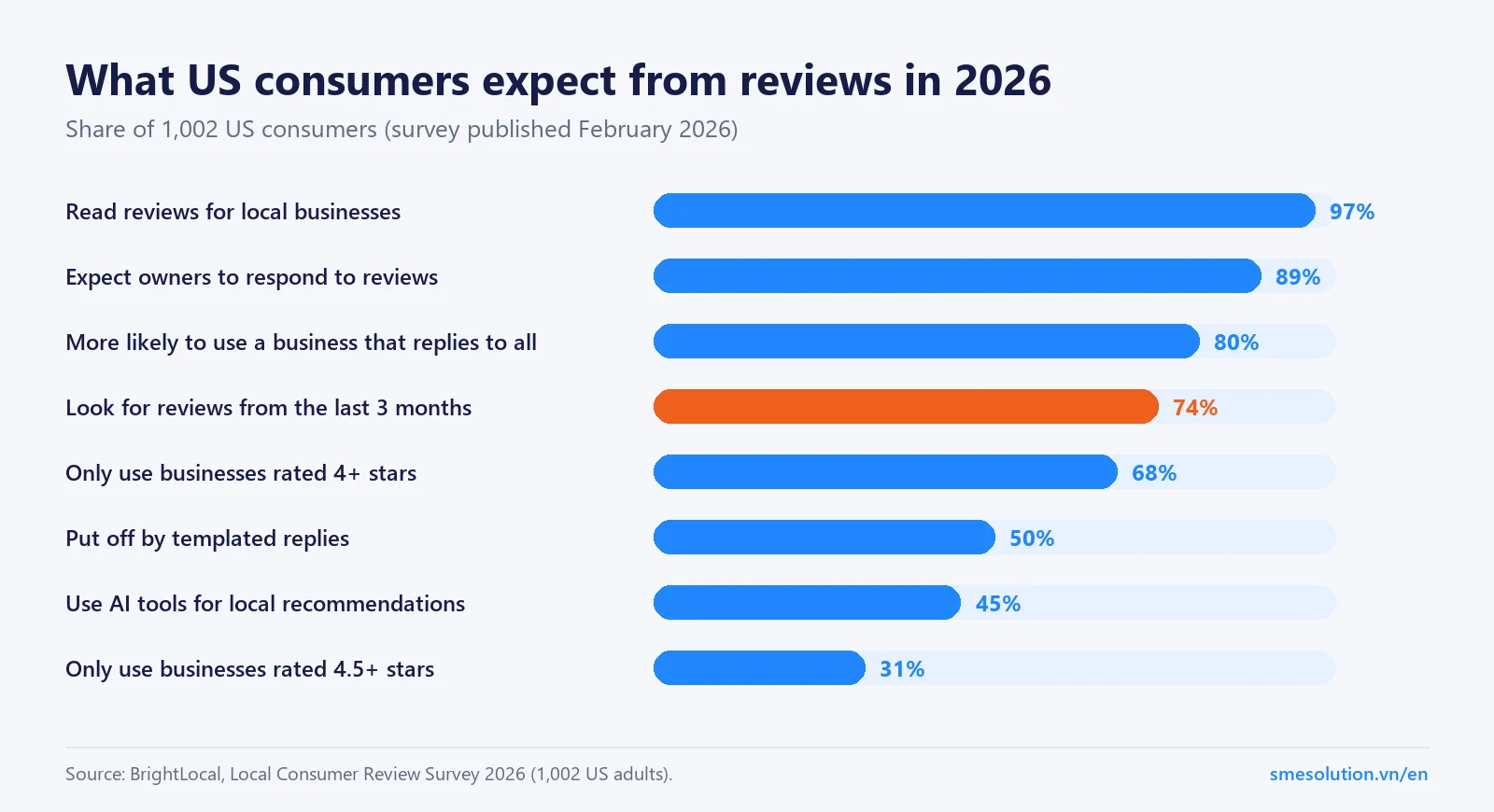
Source: BrightLocal Local Consumer Review Survey 2026.
Review recency: in BrightLocal’s 2026 survey of 1,002 US consumers, 74% looked for reviews from the last three months. A profile with great reviews from two years ago looks inactive.
Replies: 89% expect owners to respond, and 80% are more likely to choose a business that replies to all reviews. Half are put off by templated replies, so they need to be written properly.
Rating thresholds: 31% will only use a business rated 4.5 stars or higher, up from 17% a year earlier.
Hours: “open at the time of search” is the fifth-ranked local pack factor in Whitespark’s 2026 survey. Holiday hours that aren’t updated cost real visits.
Edits from others: Google and the public can suggest changes to your profile. Someone needs to check them.
That’s why our plan is monthly. The checklist below is the starting point; the routine after it is what keeps the profile ranking.
Our 15-point Google Business Profile checklist
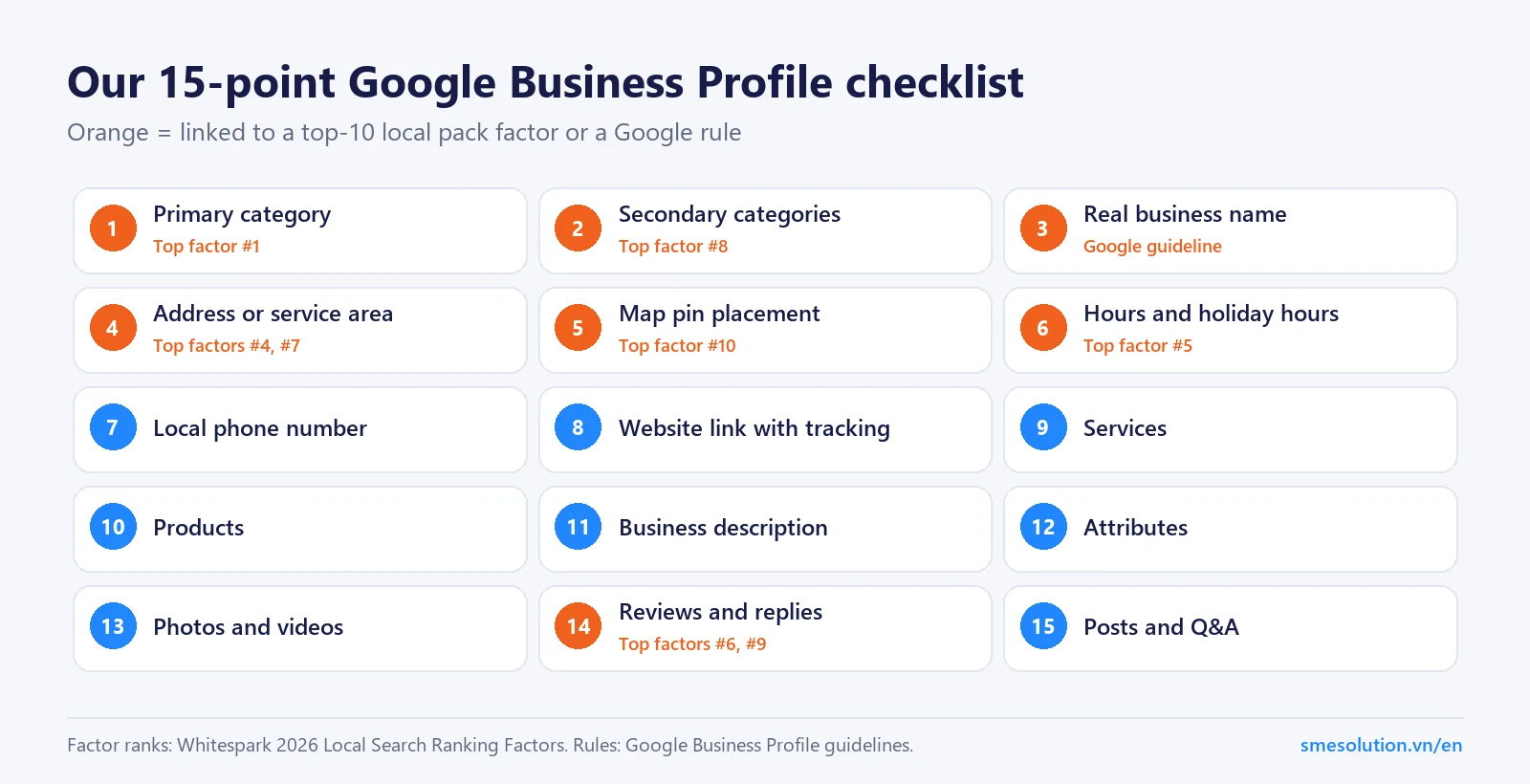
These are the 15 items we work through on every profile. Six of them map directly to factors that local SEO experts rank in the top ten for the local pack in Whitespark’s 2026 survey, and one to a rule in Google’s guidelines.
Our 15-point checklist. Orange items link to a top-10 factor or a Google rule.
#
Item
What we do
Why it matters
1
Primary category
Choose the most specific category for your most valuable service
The #1 local pack factor (Whitespark)
2
Secondary categories
Add only those that genuinely describe what you do
#8 factor
3
Business name
Use your real-world name, nothing added
Google guideline; stuffed names risk suspension
4
Address or service area
Real address, or hidden address plus service area if you travel to customers
#4 and #7 factors; Google rules on addresses
5
Map pin
Check the pin sits on your actual entrance
#10 factor
6
Hours
Regular, holiday and special hours
#5 factor; stops wasted trips
7
Phone number
A local number that matches your website
Consistency and trust
8
Website link
Link to the right page, with tracking parameters
Lets you see visits from the profile in analytics
9
Services
Listed in customers’ words, with short descriptions
Relevance for specific searches
10
Products
Key products or packages, with photos and prices where sensible
Relevance and a fuller listing
11
Description
What you do, for whom and where, in plain language
Helps customers decide
12
Attributes
Accessibility, payment, amenities and others that apply
Customers filter by them
13
Photos and videos
Exterior, interior, team and real work, added regularly
Trust and engagement
14
Reviews and replies
A routine for asking customers; personal replies to every review
#6 and #9 factors; most people read reviews first
15
Posts and Q&A
Offers, recent work and answers to common questions
Keeps the profile active and useful
Google’s rules that can get a profile suspended
A suspended profile disappears from the map, and getting it back can take weeks. These are the guideline areas we’re most careful with, based on Google’s guidelines for representing your business.
Name: your name should reflect your real-world business name, without unnecessary information such as keywords, taglines or locations.
Address: it must be precise and real. Virtual offices don’t qualify, and a shared or co-working space only counts if it’s staffed by your team during business hours.
Service-area businesses: if you serve customers at their location and not at yours, Google asks you to hide your address.
One profile per location: don’t create more than one profile for each location, whether in one account or several.
Keywords in the business name deserve a special mention. They rank third among local pack factors in Whitespark’s survey, which is exactly why they’re tempting. We don’t add them, because the risk to the profile outweighs the gain.
How to get more Google reviews without breaking the rules
Reviews are where most profiles fall behind, and also where the rules are easiest to break by accident. Google’s policy on fake engagement is specific. Businesses may not offer incentives such as payment, discounts or free services in exchange for a review, may not discourage negative reviews, and may not selectively ask only happy customers. Reviews from people with a conflict of interest, such as current or former employees, are removed.
Within those rules, a lot is possible. What works for most small businesses is a routine rather than a campaign:
Ask every customer, at the right moment. Right after a job is finished or a visit goes well, by text or email, with a direct link to your review form.
Make it easy. One tap from the message to the review box. Every extra step loses people.
Keep it steady. A few reviews every week look more natural, and serve the 74% of consumers who look for recent reviews, better than fifty in one month and then nothing.
Reply to every review. Thank people by name and mention what they bought. For a negative review, acknowledge it, take the details offline and fix what you can. Future customers read the reply as much as the complaint.
We set this routine up with you in the first month and write the reply drafts each month after that.
Photos that actually help
Stock images don’t help anyone choose you. The photos that work show what a customer will actually see and get: the outside of your premises, so people recognise it when they arrive; the inside; your team; and real examples of your work or products. Add new ones regularly rather than uploading a hundred at once, and replace anything out of date, like an old sign or a room you’ve renovated.
This is the one part of the job that needs someone on site. Most clients shoot photos on a phone in an afternoon, following a short shot list we send. If you’d rather have professional photos, a local photographer for half a day usually covers a year’s worth.
Profiles for businesses with several locations
Each location needs its own profile with its own address, hours, phone number and photos. The same checklist applies to each, with two extra jobs. First, consistency: names, categories and descriptions should follow one pattern, so customers and Google recognise them as one brand. Second, duplicates: multi-location businesses are the most likely to have stray old profiles that split reviews. We audit every location at the start, then manage them together with one combined report.
How to tell if your profile is working
Your Google Business Profile shows how many people called, asked for directions or clicked through to your website, and which searches found you. Those are the numbers to watch, month over month, rather than a single ranking position. Adding tracking parameters to your website link (item 8 on the checklist) also lets you see in your analytics how many profile visitors filled in a form or made a booking. If a provider’s report doesn’t include these, ask for them.
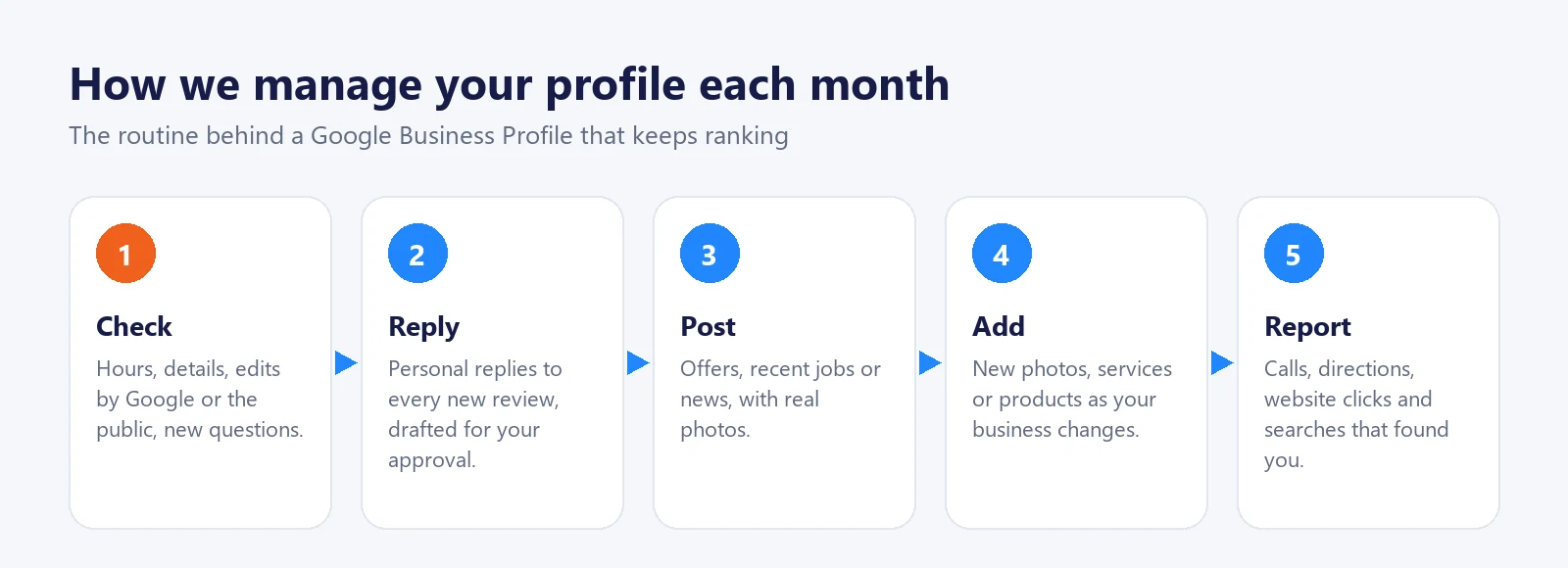
How we manage your profile each month
Each month we check your details and any suggested edits, reply to every new review, publish posts with real photos, add new services or products as your business changes, and send a report on calls, direction requests, website clicks and the searches that found you. You get a written update every two weeks.
Google Business Profile optimization cost
There are two ways to buy this work, and the price depends on which one you choose.
One-time optimization
Monthly management
Typical price
A few hundred dollars per profile. GMB Gorilla publishes $500 per profile for 1–4 profiles.
GMB Gorilla lists management from $99 to $399 per location per month. Our plan is $350.
What you get
The checklist done once
The checklist plus the monthly routine: reviews, replies, posts, updates, reports
Best for
Owners who will handle upkeep themselves
Businesses that want the profile kept active without doing it themselves
Our $350 plan covers one location and includes everything above. If you also want local pages on your website and citation work, our local SEO services plan starts at $550. The full comparison is in our local SEO pricing guide.
Doing it yourself vs hiring a manager
Do it yourself
Hire a manager
Cost
Your time: a few days to set up, then a few hours a month
A monthly fee
Works well when
One location, low competition, an owner who enjoys it
You’re busy, competition is higher, or you have several locations
Common gaps
Reviews and posts drop off when things get busy
Depends on the provider: check what they report
If you’d rather do it yourself, start with items 1, 4, 5, 6 and 14 on the checklist. They cover most of the top-ranked factors. If you’d like a second pair of eyes first, our free audit tells you what to fix in what order.
One-time optimization typically costs a few hundred dollars per profile. GMB Gorilla, for example, publishes $500 per profile for one to four profiles. Ongoing management is billed monthly; our plan is $350 per location and includes the upkeep that keeps a profile ranking.
Start with the primary category, then secondary categories, accurate hours, a correctly placed map pin, your real business name, services, products, description, attributes and real photos. Then keep it active with a steady flow of reviews, replies, posts and updates.
If the profile had clear issues, such as a generic primary category or missing services, changes often show within the first 1–2 months. Reviews and prominence build over several months, especially in competitive areas.
We can guide you through it, but the profile must be created and verified by the business at a real location or with a real service area. Verification often needs someone on site, for example to record a short video.
No. We set up a routine for asking real customers and draft personal replies for you to approve. Fake reviews can be removed and put the profile at risk.
Profile optimization covers the profile itself. Local SEO adds local pages on your website and your listings across directories, which feed the prominence part of Google’s ranking.